Business Questions
Define the key questions leadership needs answered.
Investigating enrollment decline across schools, programs, and student populations.
Academic leaders needed a reliable way to understand where enrollment was declining across academic schools and student populations. I designed a Business Intelligence solution that transformed fragmented reporting into trusted decision support, enabling leadership to identify where attention and intervention should be focused.
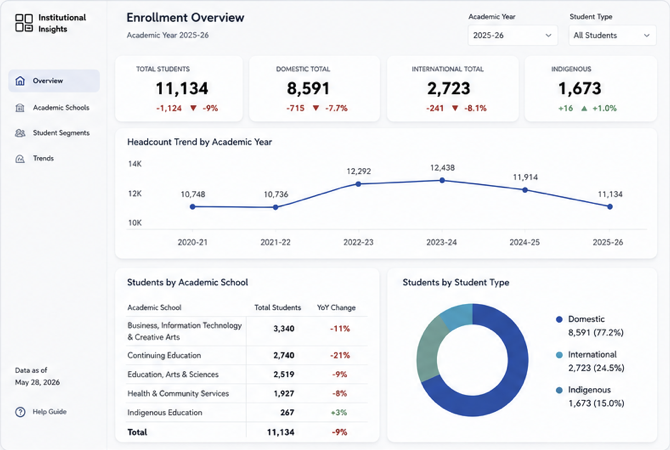
The project was designed to answer five business questions that existing reporting could not consistently address.
A structured approach was followed to transform business questions into trusted insights and executive decision support.
Define the key questions leadership needs answered.
Validate, consolidate and understand enrollment data across multiple dimensions.
Design reusable measures, KPIs and dimensional analysis to answer the business questions.
Transform analysis into an intuitive reporting experience for leaders.
Enable leaders to identify trends, priorities and areas that require further investigation.
The final dashboard provides executive leaders with a trusted view of enrollment performance, student populations and academic school trends.
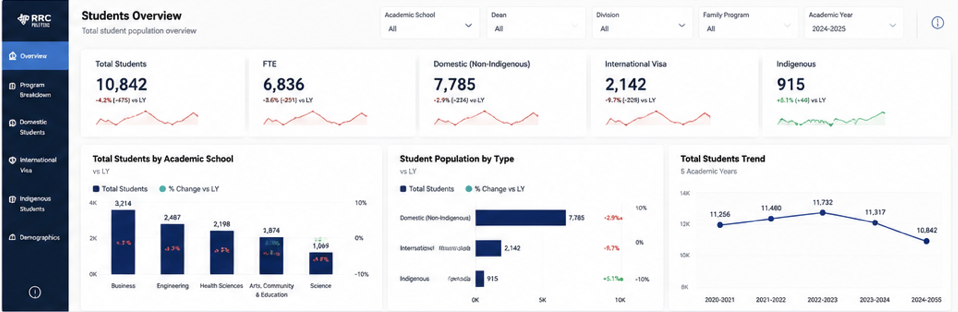
High-level monitoring of total students and FTE with year-over-year performance.
Compare enrollment changes across different student populations.
Identify where enrollment declines are concentrated.
Understand long-term direction and distinguish short-term fluctuations.
The analysis highlighted where enrollment changes were concentrated and where leadership attention should be focused.
Every design decision was made to ensure clarity, trust, and usability for executive stakeholders who rely on this dashboard for planning and resource allocation.
Validated metrics and business rules were prioritized over fast development to ensure executive confidence in the numbers.
The information architecture was organized around key business questions to make insights easy to find and act on.
Measures and dimensions were designed to support future reporting without rebuilding calculations.
The semantic model allows additional enrollment dashboards to reuse the same analytical foundation.
I'm always open to discussing data, analytics and opportunities.